재난 대책 본부에서 스트리밍 중인 영상을 vlc player로 재생시켜보자
사전 준비
기본 경로에 vlc를 설치한다.
Win 32: https://get.videolan.org/vlc/3.0.9.2/win32/vlc-3.0.9.2-win32.exe
Win 64: https://get.videolan.org/vlc/3.0.9.2/win64/vlc-3.0.9.2-win64.exe
스트리밍 영상 주소 확인 법
제주 재난 안전 본부 cctv 영상 페이지에서 개발자 도구 표시 > 네트워크 탭 > Headers > Request URL
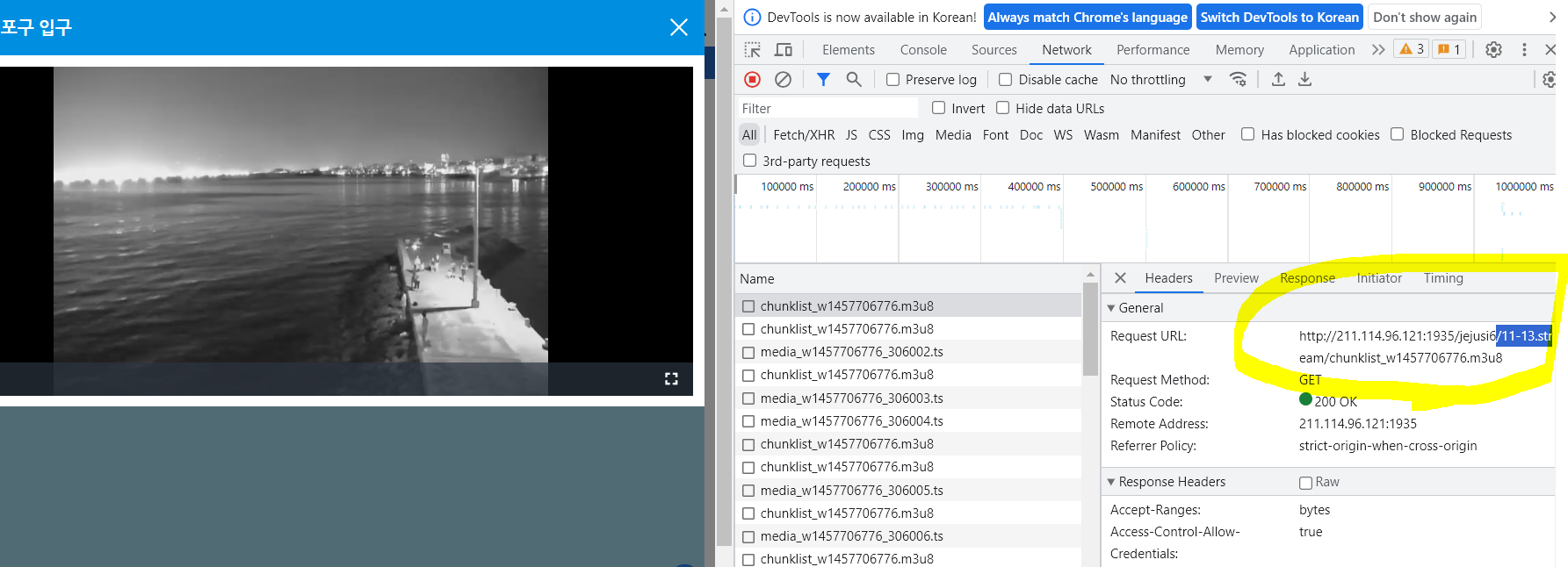
코드
import os
os.add_dll_directory(r'C:\Program Files\VideoLAN\VLC')

import vlc
import pyperclip
import time

def play_hls_stream(url):
    instance = vlc.Instance('--no-xlib')  # GUI 없이 실행하기 위한 옵션
    player = instance.media_player_new()

    media = instance.media_new(url)
    media.get_mrl()

    player.set_media(media)
    player.play()

    while True:
        time.sleep(1)

if __name__ == "__main__":
    url = "http://211.114.96.121:1935/jejusi6/11-13.stream/chunklist_w1457706776.m3u8"
    play_hls_stream(url)
참고:
챗gpt 코드
스택오버플로우 https://stackoverflow.com/questions/59014318/filenotfounderror-could-not-find-module-libvlc-dll
FileNotFoundError: Could not find module 'libvlc.dll'
Using Python 3.8.0, 64 bit OS: Windows 10 Pro, Version 10.0.15063 Build 15063, 64 bit VLC, 3.0.8 Vetinari, 64 bit Have installed Python VLC Bindings through PIP The path to VLC and the direct p...
stackoverflow.com
'Python' 카테고리의 다른 글
| 정말 간단한 등고선 예제 (0) | 2022.12.12 |
|---|---|
| 파이썬 모듈 설치 관련 에러 최소화하는 법 (1) | 2022.12.08 |
| 맥에서 주피터 노트북이 실행되지 않는 경우 (0) | 2022.11.21 |
| 해수면 온도 시각화 (1) | 2022.11.18 |

